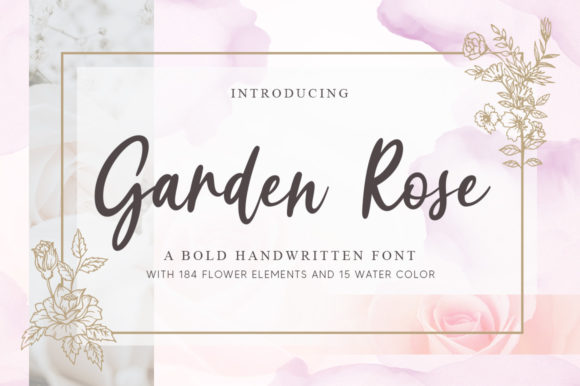
Garden Rose: A Handwritten Font for Creative Expression
Garden Rose is a refined and dainty handwritten font that brings a touch of elegance and personality to any design. Its cursive style, combined with its joyful and romantic aesthetic, makes it an excellent choice for a variety of creative applications. Whether you're designing wedding invitations, crafting personalized cards, or building a brand identity, Garden Rose can add a unique visual element that stands out in a crowded digital space.
Understanding Garden Rose
Garden Rose is more than just a font—it's a visual language that conveys warmth, artistry, and individuality. The font's flowing lines and delicate curves mimic the natural beauty of handwritten script, making it ideal for projects that require a personal touch. Unlike standard sans-serif or serif fonts, Garden Rose offers a level of intimacy and charm that is difficult to replicate with digital typography alone.
The font's character set includes all necessary punctuation and special characters, ensuring compatibility with most design software and platforms. It also supports multiple languages, making it a versatile option for international projects or multilingual content creation.
Where Garden Rose Fits In
Garden Rose can be integrated into various stages of a creative workflow. It is particularly well-suited for pre-design tasks such as brainstorming, sketching, and moodboarding, where a hand-drawn aesthetic can inspire and guide the direction of a project. During the design phase, it can be used to create mockups, wireframes, or branding elements that reflect a more organic and artistic feel.
In post-production, Garden Rose can enhance final deliverables such as print materials, social media graphics, or digital assets. It works especially well with other design tools like Adobe Photoshop, Illustrator, Canva, and even web development platforms like WordPress or Squarespace. When paired with complementary fonts or color schemes, Garden Rose can help create a cohesive and visually appealing design system.
Practical Use Cases
Garden Rose is best suited for projects that benefit from a personal and romantic tone. Here are some common use cases:
- Wedding Invitations: The elegant yet playful nature of Garden Rose makes it perfect for creating invitations that reflect the couple’s style and personality.
- Personalized Cards: Whether it's a thank-you note, birthday card, or sympathy message, Garden Rose adds a heartfelt and handmade quality to your writing.
- Branding: For small businesses or creative entrepreneurs, using Garden Rose in logos, packaging, or marketing materials can help establish a unique brand identity.
- Printed Materials: From brochures to posters, Garden Rose can elevate the visual appeal of printed content while maintaining readability.
- Digital Content: Social media posts, blog headers, and email signatures can all benefit from the charm and versatility of Garden Rose.
When selecting a font for a project, it's important to consider both aesthetics and functionality. While Garden Rose is beautiful, it may not always be the most readable option for long-form text. As such, it's often best used in combination with a more legible font for body text, ensuring clarity without sacrificing style.
Integration with Other Tools and Platforms
Garden Rose is compatible with most major design and productivity tools, making it easy to incorporate into your existing workflow. Here are a few examples:
Adobe Creative Suite: Garden Rose works seamlessly with Adobe Photoshop, Illustrator, and InDesign, allowing for precise control over text placement, sizing, and styling. It is also fully supported in Adobe XD for UI/UX design projects.
Canva: This online design platform allows users to easily apply Garden Rose to templates, making it accessible for those who prefer a more user-friendly interface. Simply search for the font within Canva’s library and apply it to text elements as needed.
WordPress: If you're using WordPress for a website or blog, you can install Garden Rose via a plugin like Google Fonts or by uploading the font files directly. This allows you to use the font in headers, footers, and other design elements without compromising performance.
Squarespace: This website builder also supports custom fonts, including Garden Rose. You can either download the font and upload it to your site or use a service like Google Fonts to integrate it effortlessly.
By integrating Garden Rose with these tools, you can maintain consistency across your design assets while keeping your workflow efficient and streamlined.
Workflow Tips for Using Garden Rose
To get the most out of Garden Rose, it's helpful to follow a few practical tips:
- Plan Ahead: Before starting a project, consider how Garden Rose will fit into your overall design vision. Will it be used as a primary or secondary font? How will it interact with other design elements?
- Test Compatibility: Always test Garden Rose in different contexts to ensure it reads well on various devices and screen sizes. Pay attention to spacing, contrast, and legibility.
- Use It Strategically: While Garden Rose is beautiful, it should be used sparingly to avoid overwhelming the reader. Save it for headlines, callouts, or decorative elements rather than large blocks of text.
- Organize Your Assets: Keep track of the font files and any associated licenses to ensure compliance and easy access when working on future projects.
- Stay Consistent: Maintain a consistent application of Garden Rose throughout your designs to reinforce brand identity and visual coherence.
By following these steps, you can ensure that Garden Rose enhances your work without detracting from its purpose or usability.
Conclusion
Garden Rose is a versatile and expressive font that can elevate your creative projects with its romantic and handwritten style. Whether you're designing for personal use or professional branding, understanding how to integrate Garden Rose into your workflow can make a significant difference in the final outcome. With careful planning, strategic use, and seamless integration with other tools, Garden Rose can become a valuable asset in your design toolkit.